
Build an expense tracker app with AI
Updated
An AI app builder can create a budget app from a short description: the money left this month, spending by category and recent transactions. Bappfy generates it as a real Android and iOS app that saves its data, with a clean fintech design you can restyle by chat.
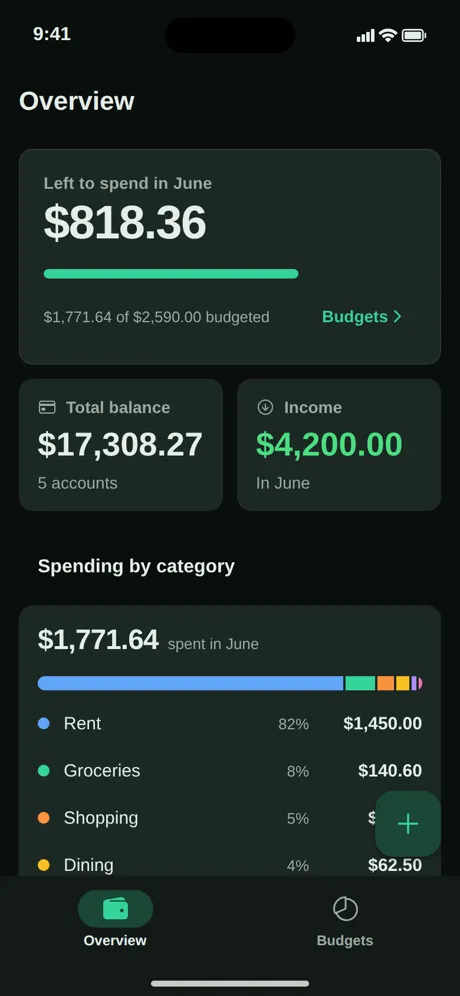
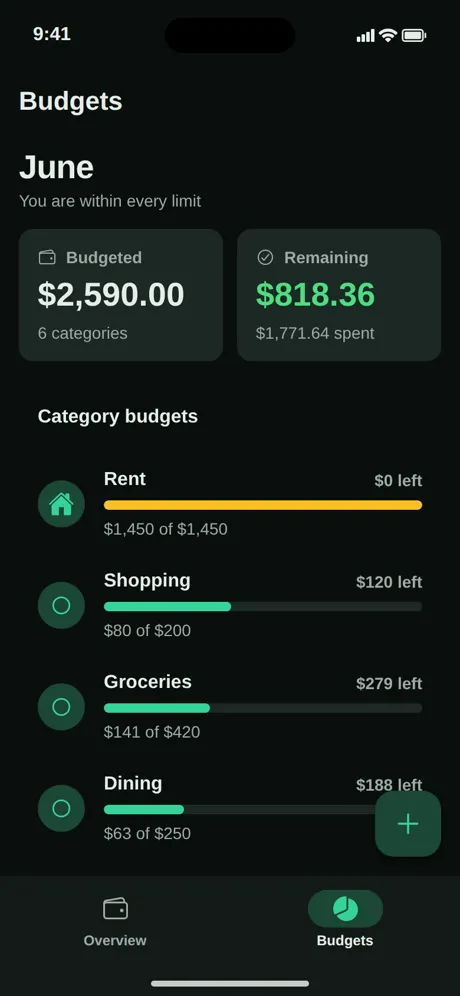
Ledger · Expense manager, generated by Bappfy. Play with it live in Explore.
The prompt
“An expense manager called Ledger: an Overview with what is left to spend this month and a budget bar, total balance and income, spending by category with a bar and amounts, and a Budgets tab with a progress bar per category.”
Features
- Left to spend this month with a budget progress bar
- Total balance and income cards
- Spending by category with percentages and amounts
- Budgets per category with what is left
- A floating button to add a transaction
What this app does
Ledger answers the one question people open a budget app for: how much can I still spend this month? The Overview shows it at the top, then where the money went by category.
The Budgets tab lists a limit for each category, how much is spent and how much is left, so overspending is visible at a glance.
How to build your own expense tracker with Bappfy
- 1
Describe it
Paste the prompt below or write your own idea in plain words. Add a sketch or a screenshot if you have one.
- 2
Approve the plan
Bappfy proposes the screens, the data the app stores and its design. Change anything by chat before a single line is built.
- 3
Watch it being built
Each screen is written live, then you tap through it in the browser or on your phone with Expo Go. A new screen costs 10 credits.
- 4
Publish it
Export .aab, .apk and .ipa files, send them straight to Google Play and TestFlight from Bappfy, or publish the same app as a website.
Ideas to make it yours
- Shared budgets for a couple or roommates
- Savings goals with a progress ring
- Receipts photographed with the camera and attached to a transaction
- Monthly reports exported as a file
Frequently asked questions
- Do I need to code to build a expense tracker app?
- No. You describe the app and approve the plan; Bappfy writes the React Native code. You can still download the full project or push it to GitHub if a developer wants to continue.
- Is it a real native app?
- Yes. Bappfy generates an Expo / React Native project that runs on Android and iOS, with a Material 3 look on Android and the Apple style on iPhone. The same project can also be published as a website.
- Can I put my expense tracker app on Google Play and the App Store?
- Yes, with Pro or Business. Bappfy builds the store files through your own Expo account and can send them straight to your Google Play account (internal testing) and to TestFlight. You release them from your own developer accounts.
- Can it connect to bank accounts?
- Not out of the box. Bank connections need a banking data provider and a backend; the exported code is a solid base a developer can extend.